Modern calendar applications have evolved far beyond static date grids and manual event entries. The latest innovation transforming how professionals and everyday users manage their schedules is natural language scheduling—the ability to create, modify, and manage calendar events using plain English conversational commands instead of clicking through menu options. This comprehensive guide explores calendar applications equipped with natural language processing, how this technology works, and which solutions best serve different user needs.
What is Natural Language Scheduling in Calendar Applications?
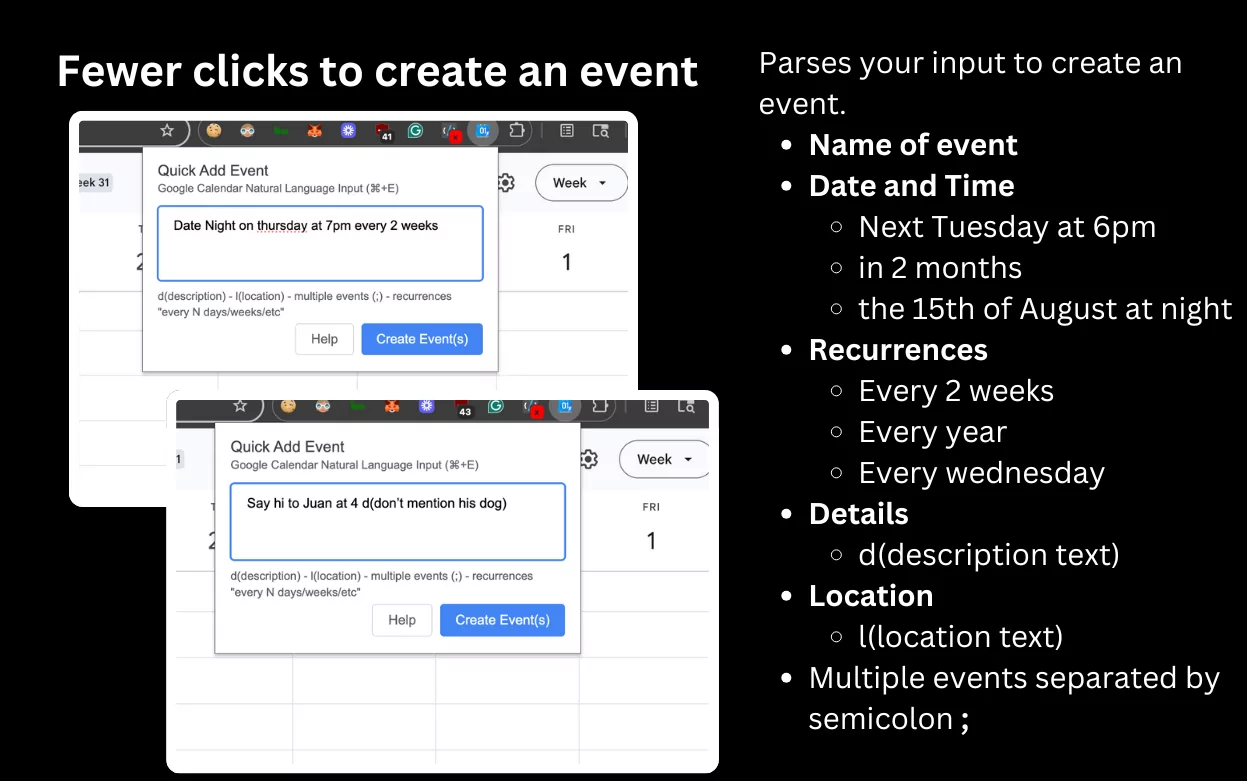
Natural language scheduling leverages artificial intelligence and natural language processing (NLP) to interpret human-written or spoken scheduling requests and automatically create calendar events, set reminders, and coordinate meetings. Instead of manually selecting dates, times, locations, and attendees through traditional interface navigation, users simply type or speak conversational phrases like “Schedule a team meeting tomorrow at 2 PM with the marketing department” and the application intelligently parses the request to generate the appropriate calendar event.
This technology understands contextual scheduling language including relative time references (“tomorrow,” “next Friday,” “in three weeks”), duration specifications (“2-hour meeting,” “until 5 PM”), recurring patterns (“every Tuesday,” “weekly from January to March”), and meeting details (“lunch at the Italian restaurant,” “video call with international team”). The application instantly recognizes these elements and populates your calendar accordingly.
How Natural Language Processing Enables Smart Scheduling
- Temporal Understanding: Recognizes relative dates and times (“next Monday at 9 AM,” “in two hours,” “three weeks from now”) and converts them to specific calendar dates
- Duration Parsing: Extracts meeting length information (“2-hour meeting,” “30 minutes,” “until sunset”) from conversational text
- Participant Recognition: Identifies attendee names and email addresses, automatically adding them to meeting invitations
- Location Extraction: Detects venue information (“conference room B,” “client office downtown,” “virtual meeting”) and adds location details
- Recurring Pattern Detection: Understands repetition instructions (“every week,” “twice monthly,” “alternating Mondays and Thursdays”)
- Context Awareness: Learns user scheduling preferences and patterns, suggesting optimal meeting times based on historical availability
- Conflict Resolution: Identifies scheduling conflicts automatically and suggests alternative times or proposes rescheduling options
Top Calendar Applications with Natural Language Scheduling Features
1. Magic AI Calendar Agent: Best for ChatGPT-Style Calendar Control
Magic AI Calendar Agent represents the cutting edge of AI-powered calendar management, allowing users to schedule events through conversational chat interfaces powered by ChatGPT, Gemini, Claude, and other leading language models. It functions as a dedicated AI assistant specifically for calendar coordination, 10x faster than traditional calendar apps.
- Natural Language Event Creation: Create single or multiple events through simple conversational commands like “Schedule a stand-up meeting tomorrow from 10:00 to 10:30 AM” or “Create three team meetings next week on Monday, Wednesday, and Friday at 2 PM”
- Bulk Event Creation: Add multiple calendar events with a single sentence, ideal for batch scheduling or complex recurring patterns
- Smart Schedule Checking: Ask your calendar questions in plain English—”What’s on my schedule tomorrow?” “How many meetings do I have next week?” “When is my next presentation?”
- Event Search & Summarization: Instantly search your calendar by asking “Find all meetings with the sales team” or “Show me all one-on-ones this month”
- Conflict Detection: The AI automatically identifies scheduling conflicts and suggests resolution options
- Event Modification: Update or reschedule existing events conversationally—”Move my 2 PM meeting to 3 PM” or “Reschedule my focus time from tomorrow to Friday”
- Event Deletion: Remove calendar items through natural language—”Delete my 3 PM standup” or “Cancel tomorrow’s office hours”
- Multiple AI Engines: Choose your preferred AI language model (ChatGPT, Gemini, Claude) based on personal preference
- Google Calendar Integration: Works seamlessly with existing Google Calendar setup without requiring calendar migration
- Cost: Pricing varies based on AI model selection and usage volume
Best For: Users who want ChatGPT-like conversational control over their entire calendar. Ideal for those managing complex scheduling across multiple teams or departments who need to handle bulk event creation efficiently.
2. Clockwise AI: Best for Intelligent Meeting Rescheduling
Clockwise combines natural language processing with sophisticated scheduling algorithms to not only understand user scheduling requests but also analyze vast amounts of calendar data to find optimal meeting times across complex, distributed teams.
- Natural Language Chat Interface: Schedule events through conversational chat—”Can you move all of my 1:1s to later this week?” and Clockwise analyzes all one-on-ones, suggests optimal times, and presents trade-off scenarios
- Meeting Rescheduling at Scale: Request bulk meeting moves—”Reschedule all my meetings when I’m out of office” and Clockwise intelligently rearranges dozens of meetings while respecting participant preferences
- Intelligent Meeting Finding: Request specific types of meetings—”Book five back-to-back 1:1s with the engineering team” and Clockwise navigates complex schedules to find optimal times
- Preference Learning: The AI understands team preferences and habits (who prefers morning meetings, lunch hour flexibility, focus time needs) to suggest times that work well for everyone
- Time Zone Intelligence: Automatically handles international scheduling across multiple time zones without manual adjustment
- Focus Time Protection: Clockwise understands your preferred focus blocks and works around them when rescheduling
- Bulk Operations: Clear your entire day, reschedule meeting series, or create multiple appointments in single chat requests
- Integration with Popular Tools: Works with Google Calendar, Outlook, Zoom, Slack, and enterprise CRM systems
- Cost: Free trial available; subscription plans starting around $10/month for individual use, enterprise pricing available
Best For: Busy professionals managing distributed teams across time zones. Particularly valuable for managers scheduling multiple one-on-ones or executives coordinating complex meeting schedules involving many participants.
3. Fantastical: Best for Multi-Platform Natural Language Input
Fantastical by Flexibits offers one of the most powerful and refined natural language input systems for calendar event creation, available across Mac, iPhone, iPad, and Apple Watch with seamless synchronization.
- Sophisticated Natural Language Parsing: Type event descriptions like “Lunch with Sarah at noon for 30 minutes” or “Team meeting next Friday at 2 PM in Conference Room B” and Fantastical intelligently extracts all relevant details
- Multi-Language Support: Supports natural language input in English, French, German, Italian, Spanish, European Portuguese, Brazilian Portuguese, and Japanese
- Complex Scheduling Patterns: Handles sophisticated recurring events—”Piano lessons Tuesdays and Thursdays at 6 PM from January 21 to February 23″ or “Dentist appointment every 6 months starting March 15”
- Quick Entry Interface: Minimize typing with Fantastical’s fast parsing—”Meeting 7 am” automatically creates a calendar event at 7 AM without additional input
- Calendar Assignment: Assign events to specific calendars while typing by adding “#CalendarName” to the entry
- Duration Flexibility: Specify duration multiple ways—”Event for 2 hours,” “Event from 4-6 PM,” “Event at 4 PM until 6 PM” all parse correctly
- All-Day Event Recognition: Type just “Birthday” or “Holiday” and Fantastical defaults to all-day events
- Time Zone Support: Include time zone in natural language—”Meeting at 2 PM in GMT-3″ automatically converts to your local time
- Customizable Parsing: Turn natural language processing off or add quotation marks to create events with exact literal text when needed
- Cost: Subscription ($4.99/month or $49.99/year) covers all platforms
Best For: Apple ecosystem users who want elegant, multilingual natural language scheduling. Perfect for those who prefer typing conversational event descriptions over menu navigation. Ideal for Mac and iOS users who want consistent experience across all devices.
4. BusyCal: Best for Professional Mac Users
BusyCal combines powerful calendar management with natural language input features, specifically optimized for Mac users and those managing complex professional schedules.
- Natural Language Event Creation: Type event descriptions like “Meeting with John tomorrow at 2 PM” and BusyCal automatically interprets all scheduling details
- Real-Time Preview: See event details update as you type—watch titles, times, locations, and durations populate automatically from your natural language input
- Quick Add Interface: Access natural language scheduling from Mac menu bar for fast event creation without opening full calendar application
- Multi-Calendar Support: Create and manage events across multiple synchronized calendars
- Time Zone Handling: Manage schedules across multiple time zones with automatic conversion
- Appointment Reminders: Set customizable notification schedules for critical events
- Holiday Integration: Automatically includes holiday calendars for major countries and regions
- Professional Scheduling: Build complex recurring patterns and meeting series with natural language input
- Cost: Pricing available on official website; typically $49.99 one-time purchase or subscription option
Best For: Mac-focused professionals who want natural language scheduling power without leaving their desktop environment. Excellent for those managing time across multiple continents or coordinating complex professional calendars.
5. Calendars (Readdle): Best for Cross-Platform Natural Language Support
Calendars by Readdle offers powerful natural language input supporting six languages, making it ideal for international users and multilingual teams coordinating schedules.
- Natural Language Input Recognition: Create events by typing plain English descriptions—”Meeting 7 am,” “Lunch at noon for 30 minutes,” “Tennis every Wednesday and Friday at 10”
- Multilingual Support: Natural language parsing available in English, German, French, Italian, Spanish, and Russian
- Complex Event Patterns: Handle sophisticated scheduling like “Paying bills day today repeat every month” or “Event in 5 days” with automatic parsing
- Quick Conditional Scheduling: Create events with conditions—”Lunch every Tuesday until February 5″ or “Meeting until 2020-12-15”
- Calendar Assignment During Input: Use “/” to quickly select which calendar to assign events while typing
- Participant Addition: Include attendee information in natural language—”Meeting with Tom tomorrow at 2 PM”
- Custom Time Entry: Specify exact times like “Event at 2.52 PM” for precise scheduling
- Subscription Options: Available as one-time purchase or subscription with regular updates
- Cost: Varies by platform; typically $1.99-$4.99 range
Best For: International teams and multilingual users who need scheduling support in multiple languages. Ideal for those coordinating across European markets or requiring non-English scheduling interfaces. Perfect for users seeking natural language features at an economical price point.
6. Vocal.app: Best for Voice-Activated Scheduling
Vocal.app specializes in voice-first natural language scheduling, allowing users to book meetings through conversational voice commands handled by AI assistants that interact with their calendar in real-time.
- Voice-Activated Meeting Booking: Call Vocal.app’s AI assistant and book meetings using conversational voice commands—the system checks your calendar for availability and confirms meeting times
- Automated Call Handling: Let the AI assistant answer calls, manage availability, and book meetings directly into your calendar without manual intervention
- Personal Availability Management: Set your available time slots, preferred meeting duration, and break times—the system respects all preferences when booking
- Real-Time Calendar Sync: All voice-booked meetings instantly sync to your digital calendar across devices
- Customizable Availability Rules: Define precisely when you’re available, block personal time, and set meeting preferences that guide all AI booking decisions
- No-Show Prevention: AI manages confirmations and reminders, reducing missed meetings and scheduling conflicts
- Hands-Free Scheduling: Perfect for busy professionals, sales teams, and customer-facing roles who need to schedule while on-the-go or managing other tasks
- Integration with Popular Calendars: Connects with Google Calendar, Outlook, and other standard calendar platforms
- Cost: Subscription-based model; pricing details available on official website
Best For: Sales professionals, recruiters, and customer service teams who book numerous meetings. Ideal for busy executives who want hands-free scheduling. Perfect for anyone managing high-volume appointment coordination across geographies.
Key Benefits of Natural Language Scheduling Features
Time Savings and Efficiency
Natural language scheduling eliminates tedious menu navigation. Instead of clicking through date pickers, time selectors, and form fields, users simply describe what they need. Research shows natural language calendar users save 5-10 minutes daily compared to traditional interface navigation—significant savings that compound across weeks and months.
Reduced Cognitive Load
Conversational scheduling matches how humans naturally think about time. Users don’t cognitively shift between “calendar interface language” and natural thinking—they schedule exactly as they’d describe the event to another person. This reduced mental friction increases calendar adoption and usage consistency.
Accessibility Improvements
Natural language interfaces make calendar applications more accessible to users with motor control challenges, visual impairments, or those who simply prefer not to use traditional mouse-and-click interfaces. Voice-activated scheduling particularly benefits hands-free scenarios (driving, cooking, working with their hands).
Reduced Scheduling Errors
Natural language processing often interprets scheduling intent more accurately than users manually navigating interfaces. When the system parses “Meeting at 2 PM with 30-minute duration,” it eliminates the chance of accidentally setting a wrong end time—common mistakes in traditional calendar interfaces.
Flexibility in Phrasing
Advanced natural language systems understand multiple ways of expressing the same scheduling concept. “Tomorrow at 2” and “2 PM next day” and “Tuesday at 14:00” all parse identically, allowing users to schedule however feels natural rather than conforming to rigid interface requirements.
How Natural Language Calendar Apps Handle Complex Scheduling
Multi-Event Bulk Creation
Command like “Schedule team check-ins Tuesday through Thursday at 10 AM with engineering, product, and design teams” are interpreted to create three separate meetings across departments, all scheduled with appropriate attendees automatically identified from organizational directories.
Recurring Event Patterns
Complex recurrence like “Weekly meetings starting January 15 through March 30 on Mondays and Thursdays at 3 PM with automatic rescheduling if someone declines” parse successfully, creating sophisticated event series with conditional logic.
Conflict Resolution
When natural language scheduling requests conflict with existing calendar events, the system automatically suggests alternatives rather than creating conflicts. “Schedule a two-hour strategic planning session next Thursday” might trigger “I found conflicts with your 2-3 PM meeting. Would 10 AM-12 PM or 3-5 PM work instead?”
Cross-Calendar Intelligence
Some applications analyze multiple calendars (personal, work, shared team calendars) when processing natural language requests. This prevents scheduling personal time during required work hours or team meetings during blocked focus time.
Best Practices for Using Natural Language Calendar Features
Be Specific with Time References
Natural language systems parse more reliably with explicit time information. “Meeting tomorrow at 2 PM” processes faster than “Quick meeting soon.” Include specific times, dates, and duration when possible to ensure accurate parsing.
Specify Attendees Clearly
When creating multi-attendee events, include full names or team names: “Meeting with Sarah Chen and Mark Rodriguez” parses more reliably than ambiguous names. For team meetings, use full team identifiers: “Sales team standup” rather than just “Team standup.”
Indicate Location Explicitly
Include venue information in natural language input—”Meeting in Conference Room B” or “Virtual call via Zoom.” Location details prevent confusion about in-person vs. remote meetings and help attendees prepare appropriately.
Use Consistent Language Patterns
While natural language systems accept multiple phrasings, consistency improves reliability over time. If using a specific system regularly, develop a personal phrasing pattern that your preferred app handles optimally.
Leverage Recurring Event Features
For meetings happening regularly, explicitly specify recurrence rather than creating individual events: “Weekly status meeting every Monday at 10 AM through December” creates a single recurring series rather than 12 individual events.
Integration Considerations for Natural Language Calendar Apps
Compatibility with Existing Calendars
Most natural language calendar solutions integrate with Google Calendar, Outlook, Apple Calendar, and other standard platforms. Verify compatibility with your organization’s calendar system before implementation to ensure seamless synchronization.
Enterprise Integration Requirements
Organizations using enterprise calendar systems (Microsoft Exchange, Zimbra) should verify whether natural language solutions connect reliably. Some apps require additional configuration for enterprise environments.
Privacy and Data Handling
Natural language scheduling often processes calendar content through AI systems. Verify data privacy policies, encryption standards, and whether scheduling data is retained, analyzed, or used for AI model training before adopting.
Common Challenges with Natural Language Scheduling
Ambiguous Time References
Phrases like “Next week sometime” or “Afternoon” lack specificity that scheduling systems need. More precise language (“Next Tuesday at 2 PM” or “3:30 PM tomorrow”) ensures accurate event creation.
Organizational Directory Integration
Systems struggle when participant names don’t exactly match organizational directory entries. Using full legal names or email addresses ensures participants are correctly added to meetings.
Multi-Language Scheduling
While some systems support multiple languages, switching between languages or mixing languages in single commands can confuse parsing. Stick with single language per scheduling request.
Contextual Assumptions
Natural language systems sometimes make incorrect assumptions about context. “Evening meeting with Jeff” might default to 5 PM when you meant 7 PM. Always verify parsed event details before confirming.
The Future of Natural Language Calendar Scheduling
Emerging technologies promise even more sophisticated natural language scheduling experiences. Large language models continue improving contextual understanding, allowing systems to infer scheduling preferences, predict optimal meeting times based on participant history, and even suggest meeting agendas based on natural language descriptions.
Voice-based scheduling will increasingly incorporate real-time language translation, allowing users to schedule across languages and international teams without translation barriers. Predictive scheduling, which anticipates scheduling needs based on email patterns and meeting history, will further reduce manual scheduling friction.
Integration with AI meeting assistants (which record, transcribe, and summarize meetings) will enable natural language commands to create follow-up meetings and schedule action items automatically based on meeting discussions—seamlessly converting meeting outcomes into calendar actions without additional user input.
Conclusion: Embrace Natural Language for Effortless Scheduling
Natural language scheduling represents a fundamental shift in how professionals manage their calendars—from rigid menu-driven interfaces to conversational, intuitive scheduling that matches human thinking patterns. Magic AI Calendar Agent leads in AI conversational power; Clockwise excels at intelligent meeting rescheduling at scale; Fantastical provides the most refined multi-platform experience; Vocal.app specializes in hands-free voice scheduling; and Calendars by Readdle delivers accessible multilingual support.
Whether you’re scheduling complex multi-team meetings, managing international time zones, or simply seeking faster calendar management, natural language calendar applications dramatically improve scheduling efficiency and reduce the friction that discourages consistent planning. Start with your organization’s preferred calendar platform, then layer on a natural language enhancement tool that matches your communication style and scheduling complexity. Your daily time management—and your team’s coordination—will immediately reflect this upgrade toward more intuitive, efficient scheduling technology.
